
PowerPoint presentation design
Custom PowerPoint presentations built natively, with master layouts and editable charts.
- Native PowerPoint build
- Master layouts
- Editable data charts
On-brand master templates with layouts, colours, fonts and slide libraries set up properly, so every deck your team makes starts right.
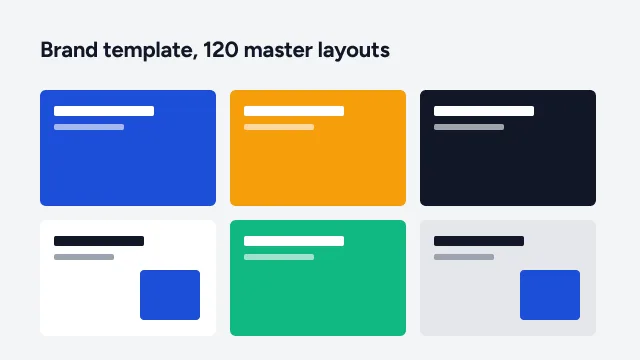
A template only helps if people can find the right layout fast. We build the master, the layouts and the libraries your team needs.
Your palette in PowerPoint’s colour picker
Heading and body fonts, set once
Logo, footer and page numbers in place
Covers and section dividers
Text, column and image layouts
Default chart colours and formats
Readable, on-brand tables
A consistent, editable icon set
Crops and frames for photos
Ready-made slides to copy and adapt
How to use the template well
Shared with your team the right way
Client names and sensitive figures are anonymised. Full case studies are shared under NDA on request.
Your brand guidelines, current decks and the slides your team makes most.
Key layouts designed for approval before the full build.
Master, layouts, styles and slide library built natively.
Revisions, then the final template files and the user guide.
What teams ask before commissioning a template.
Custom PowerPoint presentations built natively, with master layouts and editable charts.
Company profiles, strategy, board and results decks as credible as your business.
The same specialist design, built natively in Google Slides or Keynote.
Upload your deck or notes, or start with an AI draft. Our designers take it from there, from $10 a slide.
Change these any time from “Cookie settings” in the footer. Your choice is stored for 6 months.
Essential · always on
Sign-in, security, the cookie choice itself. Always on.
Analytics
Google Analytics 4 through Google Tag Manager: visits, pages, sources.
Marketing
Conversion and remarketing tags, only if you add them in Tag Manager.
We couldn’t save your choice. Please try again.