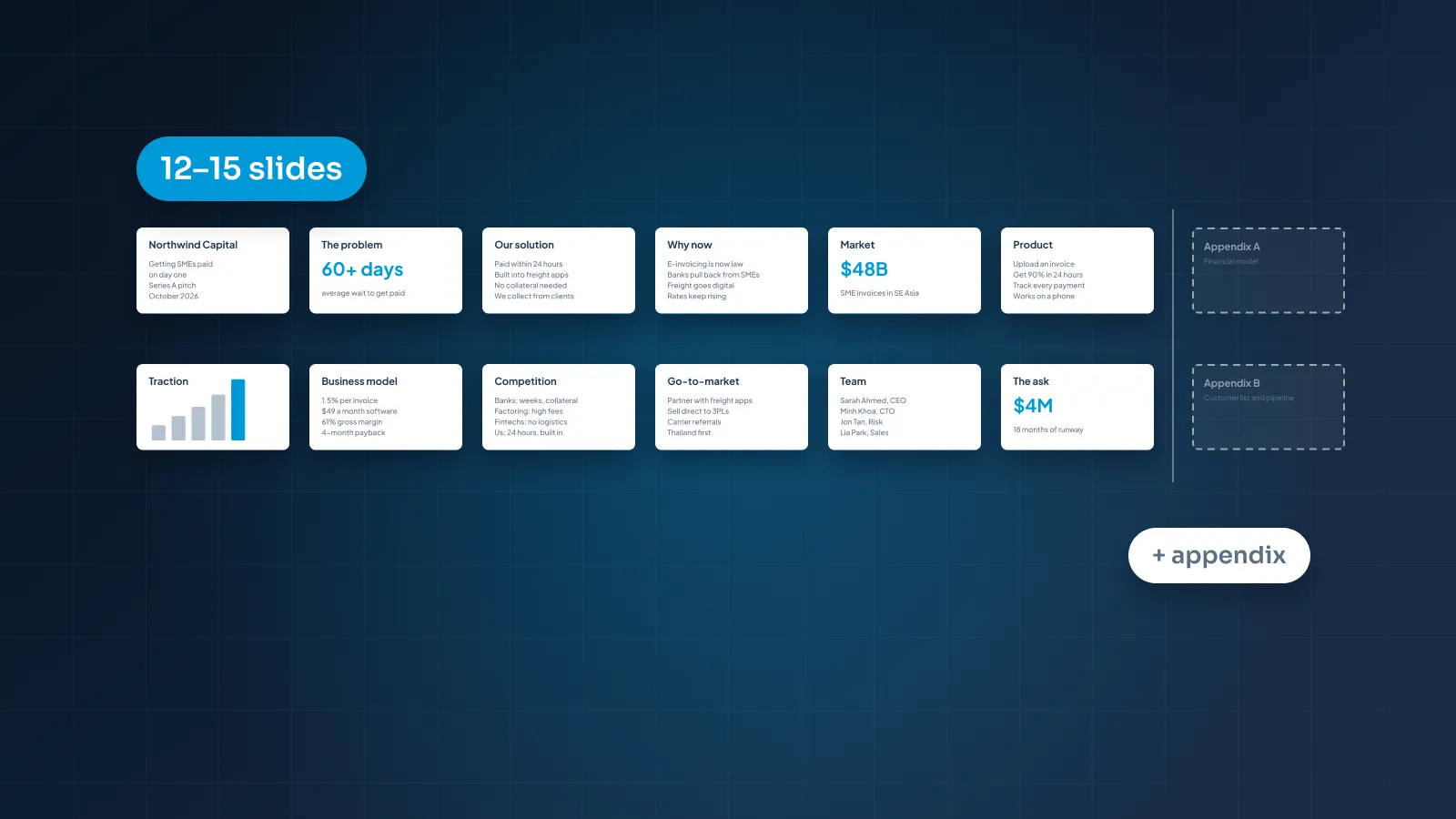

"How many slides?" is usually the first question people ask when they get a time slot. It's a fair question, but it's the wrong place to start. Two decks with the same slide count can run five minutes apart, because one carries a single idea per slide and the other carries five.
This guide gives you starting ranges for talks from 5 to 60 minutes, explains what moves the number up or down, and shows how to plan a deck from your minutes instead of guessing a count. Building a pitch deck? Our guide on how many slides a pitch deck needs covers that case on its own.
The short answer
A common rule of thumb in presentation design is about one to two minutes per slide when the slides are dense: a chart you walk through, a table, a slide with several points. Visual slides with one idea each, such as a photo with one line or a single big number, take less time. Something like 30 seconds to a minute each is a reasonable starting point.
That gives these starting ranges:
10 minutes: 5–10 dense slides, or 10–20 visual ones.
20 minutes: 10–20 dense slides, or 20–40 visual ones.
30 minutes: 15–30 dense slides, or 30–60 visual ones.
Treat these as ranges, not targets. It's a rule of thumb, not research, and one timed rehearsal tells you more than any formula.
The principle that decides the number is one idea per slide. It's the first rule in our guide to making a PowerPoint look professional, and it does the counting for you: list your ideas, give each one a slide, and the slide count follows.
Why there's no fixed number
Slides per minute depends on what's on each slide and how the deck will be used. These are the factors that move it most.
Presented or sent
A deck you present supports your voice. A deck you send has to work without you. The two are counted differently, because a reader sets their own pace and a speaker doesn't. Minutes per slide only really applies to the presented version. We come back to this at the end.
Dense or visual slides
A slide with a chart and three points of commentary can hold the screen for two minutes. A full-screen photo with one line might be up for 20 seconds while you tell the story behind it. A deck of each, covering the same material, can differ in slide count by a factor of two or more.
Data
Each chart needs its own time. You say what it shows, point to what matters, and give the audience a moment to see it. A deck full of charts runs slower per slide than a deck of statements, so if half your slides are data, plan toward the dense end of the range.
Questions and discussion
Questions come out of the slot before you count anything. A 30-minute slot with 10 minutes for questions is a 20-minute talk. In a decision meeting, the discussion may be the point of the meeting, which is why our guide to presenting to executives keeps the main deck short and the detail in backup slides.
Builds and animation
A slide that reveals a diagram in four steps can stay on screen for two minutes and still feel quick, because something changes every 30 seconds. Count a build as one slide with a longer time, not as four slides.
The setting
On a conference stage, each point tends to get its own slide, so the count goes up and the word count goes down. Our guide to conference presentation design explains why that suits a big room. In a webinar, people watch in a small window with other tabs open, so slides need to change more often to hold attention, as our guide to webinar slides covers. A small-room meeting with a few dense slides sits at the other end.
Slides by talk length
Here are the starting ranges for six common talk lengths. The minutes are speaking time, after you've taken questions out of the slot.
| Talk length | Visual deck | Dense deck | Keep in the appendix |
|---|---|---|---|
| 5 minutes | 5–10 slides | 3–5 slides | Background, method, all detail |
| 10 minutes | 10–20 slides | 5–10 slides | Extra data and examples |
| 20 minutes | 20–40 slides | 10–20 slides | Full tables, method, case details |
| 30 minutes | 30–60 slides | 15–30 slides | Deep dives for likely questions |
| 45 minutes | 45–90 slides | 23–45 slides | Reference slides, full financials |
| 60 minutes | 60–120 slides | 30–60 slides | Handout material, raw data |
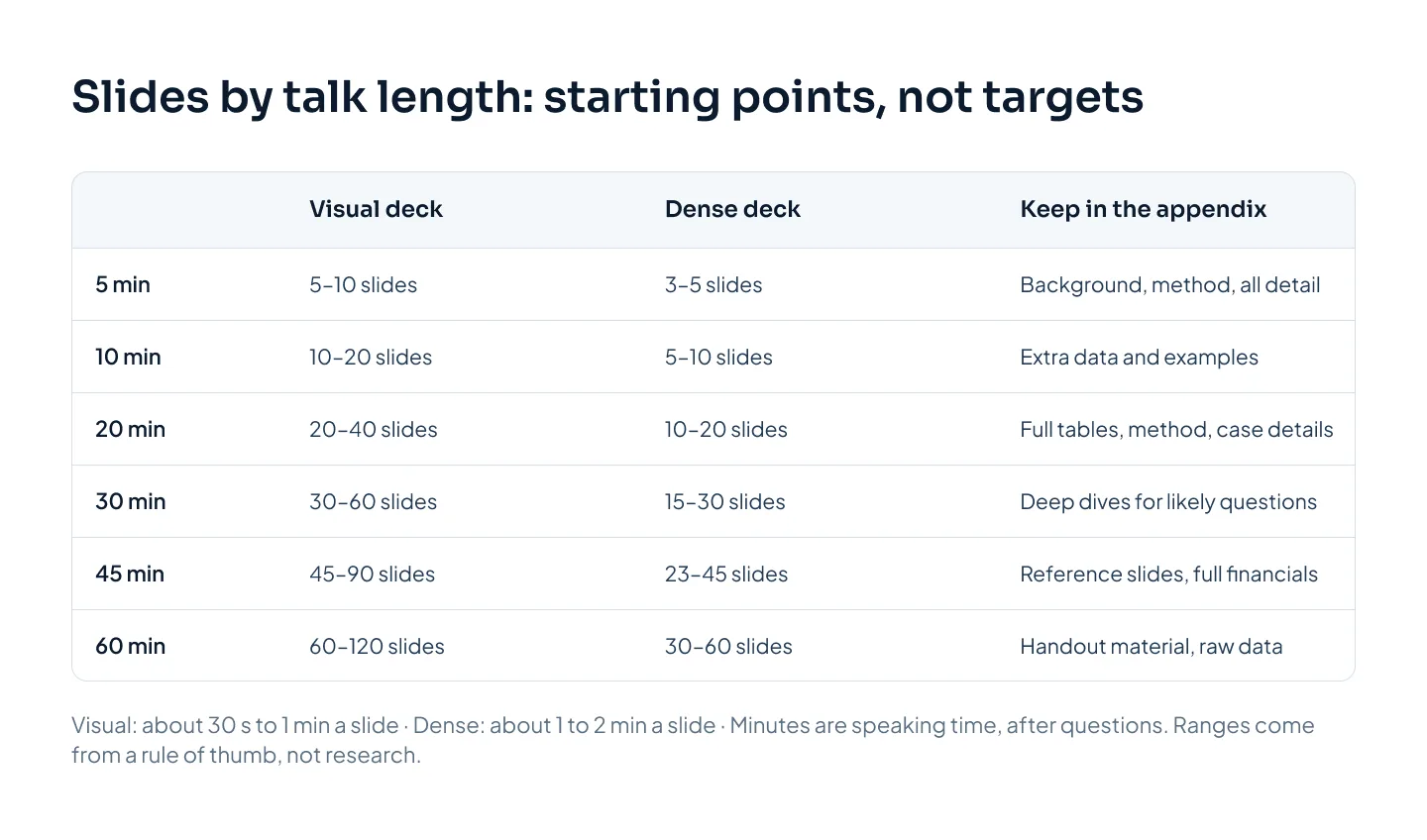
How to read it:
Visual deck means mostly one-idea slides: a statement, an image, a big number, a simple chart. Keynotes, stage talks and webinars sit here.
Dense deck means slides you talk through for a minute or two: team meetings, reviews, training with worked examples.
Most decks are mixed. If yours is half and half, aim for the middle of the two ranges.
The top of the visual range suits fast, image-led talks where slides change on almost every sentence. Few talks need it.
The appendix column matters as much as the counts. A 5-minute slot leaves room for one message and the proof behind it. Everything else, however good, belongs in backup slides you show only if someone asks.
Plan from the time, not the slides
Instead of picking a slide count and filling it, work forward from your minutes. Five steps:
Find your real speaking time. Take the slot, subtract questions, and subtract a minute or two if you're introduced or the meeting tends to start late. A 25-minute slot with 5 minutes of questions and no introduction gives you 20 minutes.
Write the message in one sentence. It's what the audience should remember if they forget everything else. Every section has to serve it.
Split the talk into sections and give each a budget. Opening, problem, main points, proof, close. The budgets must add up to your speaking time exactly.
List the ideas in each section. Each idea becomes a slide. Then check the count against the time: if a 2-minute section has seven ideas, either the section needs more time or some ideas need to go.
Rehearse with a timer, section by section. Note where each section actually ends. If one runs long, cut ideas from it rather than talking faster.
Here's what that looks like for a fictional 20-minute conference talk by Calder Robotics, a company that makes robotic picking and assembly cells. The slot is 25 minutes, with 5 for questions.
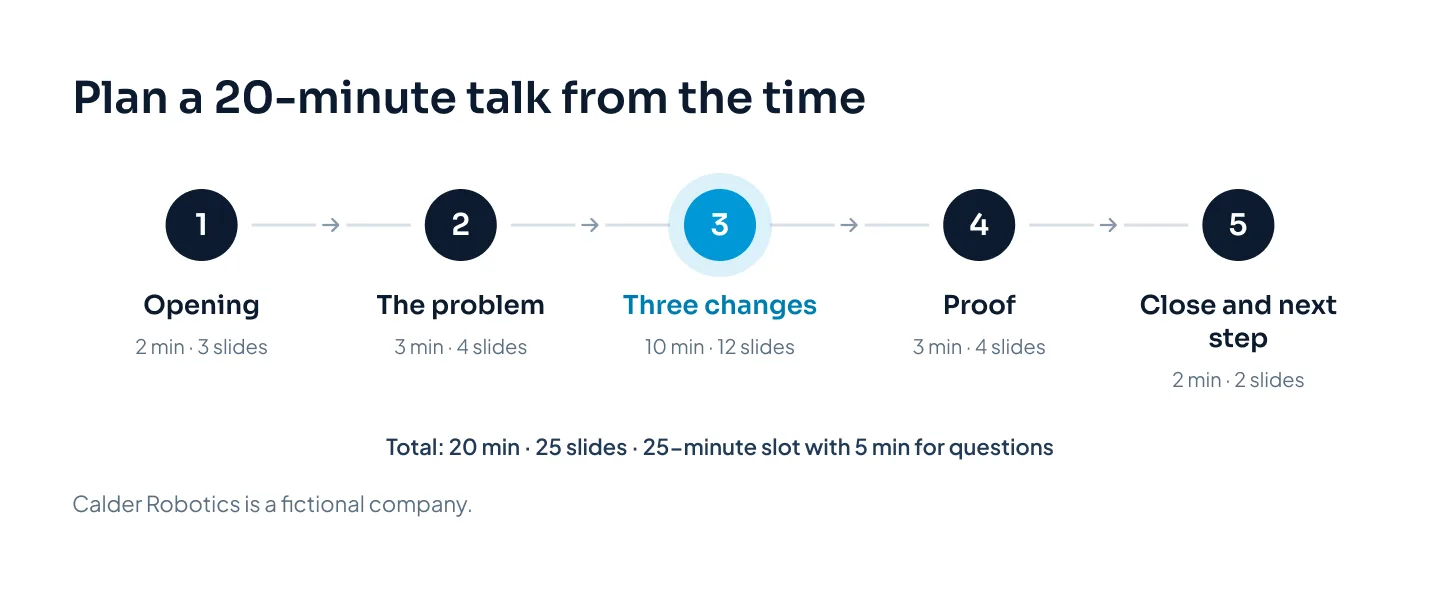
The sections add up to 20 minutes and 25 slides, or a little under 50 seconds a slide on average. That puts it in the visual range, which suits a conference stage. The "three changes" section carries half the time because it carries the message. The opening and close are short on purpose.
Planning this way also tells you where you are during the talk. If the proof section starts at minute 15 in rehearsal, you know the timing works. If it starts at minute 18, you know which section to trim.
When you have too many slides
Too many slides is rarely the real problem. Too many ideas is. If your count runs well past the range for your time, don't squeeze slides together and don't plan to talk faster. Cut ideas instead.
Here's an example from Harbor & Pine, a fictional hotel group. The left slide packs five updates onto one slide. The right side gives the three that matter a slide each, and moves the other two elsewhere.
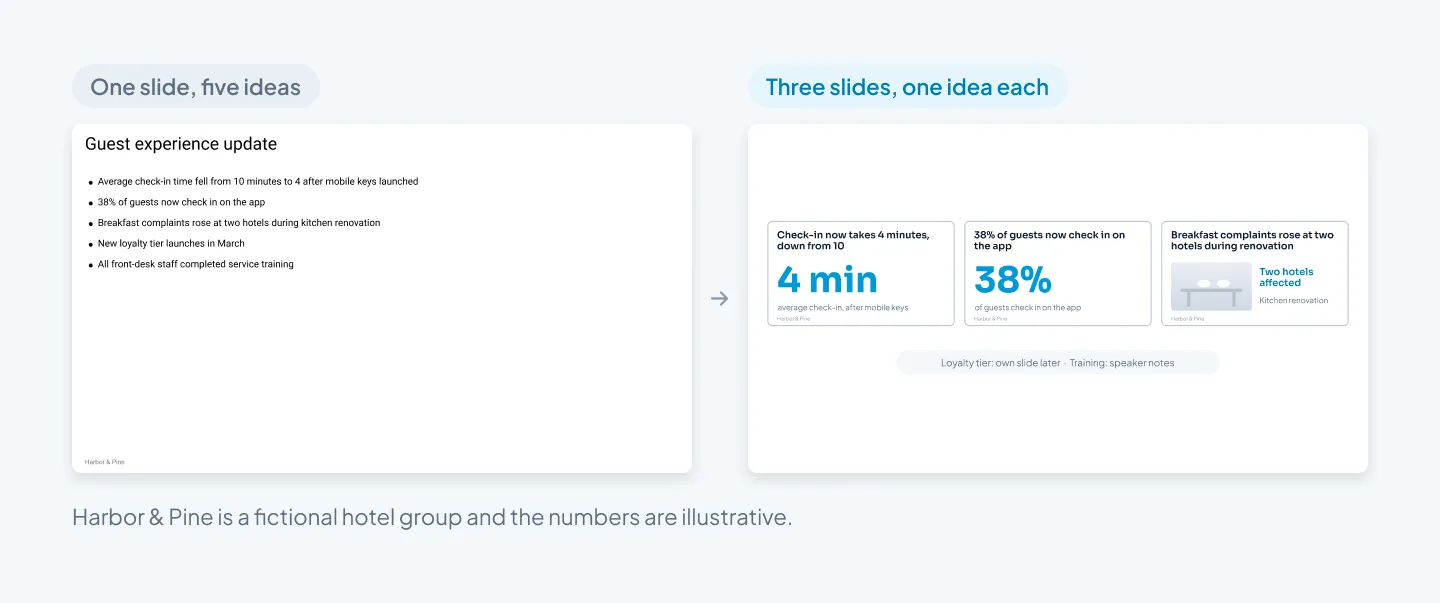
The slide count went up, and the talk got easier to follow. Each slide now has a title that states its point, and the audience reads it in a second instead of reading while you speak.
When a deck runs long, work through these in order:
Cut the ideas that don't serve your message. Some good material doesn't belong in this talk. Ask what the audience would miss if it went.
Move detail to the appendix. Put it after a clear divider, so it's ready for questions but not in the main run.
Merge slides that make the same point. Two charts proving one thing can become one chart.
Move the script to the notes. Text you'll say doesn't also need to be on screen. Our guide to cutting text on slides walks through how.
Don't shrink to fit. Cramming four slides into one with smaller type lowers the count and makes every slide harder to read.
If the count is still high after all that, ask for more time or narrow the topic. A talk that tries to cover everything in 10 minutes usually lands nothing.
A higher slide count is fine. A slide with five ideas on it isn't.
Presented, sent or both
Everything above is about decks you present. Sent decks follow different rules.
A presented deck can run to a high slide count, because each slide is on screen briefly and you carry the story. Slides are sparse, and the detail sits in your speaker notes, where Presenter View shows it to you and not the room.
A sent deck is read at the reader's pace, so minutes per slide doesn't apply. It needs fewer, fuller slides: full-sentence titles, enough text for each slide to make its point alone, and an appendix for reference. Nobody is there to skip a slide for the reader, so cut anything that doesn't earn its page.
If you need both, build them from one master file. Make the sent version first, because it holds every claim and number. Then copy it for presenting, split slides that carry more than one idea, and move the extra text into the notes. Our guide to pitch decks and investor decks shows the same approach for fundraising.
For a deck built to be presented, see our TEDx Westminster case study: slides for a TEDx talk.
If you'd rather hand the deck over, our PowerPoint presentation design service is built for this. At Pixel Presentation, design is $10 a slide with a 5-slide minimum, or $15 for complex slides such as process diagrams and multi-series charts. Speaker notes set up for Presenter View add $2 a slide, so the 25-slide Calder talk above, with notes on every slide and no complex slides, would come to $300. Check your own deck in the pricing estimator.